
If you ask Visual WebGui 6.4’s installer to include documentation in the install, it looks for Microsoft Document Explorer. But Document Explorer is no longer included in Visual Studio 2010 (complaints, Microsoft’s story). So where can I get Document Explorer?
A comment in this thread recommends installing Document Explorer from the Visual Studio 2008 media. But what if you are using Visual Web Developer Express? I couldn’t find Document Explorer on the VWD 2008 media.
After some hunting around, I found that Commerce Server offers a “prerequisite cabinet (CAB) file” that includes Document Explorer 2005 (DExplore.exe). I downloaded one 34MB cab file, extracted DExplore.exe and installed it. After that, Visual WebGui no longer complained about the missing Document Explorer.
To find the CAB files:
- Download and open the Commerce Server 2007 Quick Install Guide.
- The CAB files are listed at the end of the section on installing prerequisites. Search for “The locations for the CAB files are as follows:”.
- Select and download the CAB file.
- Extract DExplore.exe and install it.
- Save the DExplore.exe installer somewhere; you never know how long these links will work!
Direct links to the English CAB files:
Server 2008 32-bit: http://go.microsoft.com/fwlink/?linkid=63706
Server 2008 64-bit: http://go.microsoft.com/fwlink/?linkid=63730
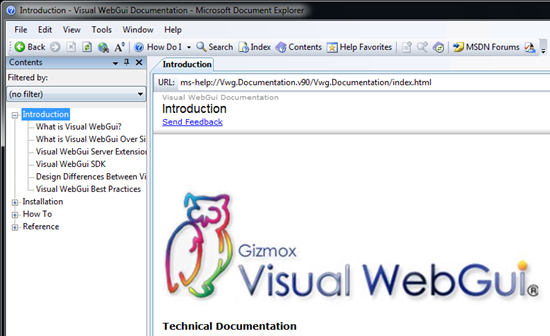
The 32-bit installer worked fine under Windows 7. Visual WebGui documentation is available in the Document Explorer:
Alternatives
If all you need is Visual WebGui documentation, these alternatives may be easier:
- View Visual WebGui documentation online.
- Download the documentation as a .chm file: search this page for “Visual WebGui Documentation”.
Update March 5, 2015
If you need Document Explorer 2008, you can find the 32-bit English version in the MSDN Library for Visual Studio 2008 SP1. After you complete that 2.2GB download, open the .iso file and extract the 10MB installer (wcu\DExplore\DExplore.exe). (If you find a smaller package that includes Document Explorer 2008, please post a comment below.)
Thank you. I was looking all over for this.
This is exactly what I needed. Been looking for this all ower the web.
this is exactly what i needed. thanks for providing this
Thank you sir..you save my day
Thank you!
Thank you! I have spend total two days before get in here!
There is one more way of questionable legality and safety.
MS DocExp system is used by Borland/Inprise/CodeRage/Embarcadero Delphi since version 2005.
Version XE2 is shipped with some pre-release version of DocExp 2008
The question is if one can get a SMALL subset of full Delphi download.
Until 2012 it was possible. One could register for trial Delphi and only download help packages.
But then FinalAware – the installer used by Delphi – found Embarcadero breaching the contract and revoked on-demand download service from them.
So Embarcadero now only ships full ISOs for official download.
Still files from those downloads are easily found in torrents and all more or less torrent clients support partial downloads. For example Delphi XE6 torrent contains those files:
Install/microsoft dexplorer 2008.7zip 9.85 MB
Install/microsoft dexplorer 2005.7zip 9.75 MB
After you rename them to .7z extension from .7zip you can unpack them using http://www.7-zip.org archiver. They are not password-protected in XE6 release. After you unpack them – they have installers inside, versions 9.0.21022.8 and 8.0.50727.42 respectively.
Same Document Explorer installer archives come with Delphi Help Update packages – but those updates are also huge (about 1GB in size for unpacked XE2 Help Update 6) and only are provided for legal Delphi owners.
So back to the “questionable legality and safety”.
Safety: Delphi is dying platform thus it is not popular among internet surfers thus it is not yet frequently targeted by virus-uploaders. So torrents with it are more or less probably vanilla DVD dumps. However if this method of getting DocExp would get popular virus-uploaders would surely install honey traps there, advertising fake Delphi torrents especially for providing infected DocExp installers.
Legality: pirated torrents with Delphi are obviously illegal per se. However DocExp there are clearly merely repacked Microsoft Redistributable Packages, thus intended for widespread and free use.
(I am responding to your request in the last paragraph.)
While the “MSDN Library for Visual Studio 2008 SP1” is certainly a very useful piece of software to download for its own sake, there are still smaller downloads, such as:
1) file GRMWDK_EN_7600_1.ISO — the “Windows Driver Kit Version 7.1.0” (649,877,504 bytes in size) (another useful file on its own), by the way) —
here is the page:
http://www.microsoft.com/en-us/download/details.aspx?id=11800
and here is the direct link:
http://download.microsoft.com/download/4/A/2/4A25C7D5-EFBE-4182-B6A9-AE6850409A78/GRMWDK_EN_7600_1.ISO
(MD5 hash: 8fe981a1706d43ad34bda496e6558f94;
SHA1 hash: de6abdb8eb4e08942add4aa270c763ed4e3d8242)
— if you mount the ISO9660 image, the Document Explorer can be found in the “\Redist\DocExplorer” folder/directory as “dexplore.exe” — it is a Microsoft Document Explorer 2008 setup file ( file version 9.0.21022.8; size: 10,361,112 bytes) — inside, there are files of version 2.7.61224.0 — and I think it think the package installs version “9.0.30729 SP” of Microsoft Document Explorer;
2) WDKDocs_12112009.exe — the “Windows Driver Kit (WDK) Documentation” (68,499,864 bytes in size) — the link to it used to be available on the same page as the “Windows Driver Kit Version 7.1.0”; unfortunately, this no longer seems to be the case (apparently, a casualty of the overhaul of “Microsoft Download Center”) and, moreover, I am unable to find its page any more; however, the direct link still works:
http://download.microsoft.com/download/3/3/C/33CFEF4D-21DA-4229-BC17-3EAC7A7EABE1/WDKDocs_12112009.exe
(MD5 hash: 6fb63bdcb8500e158841f5e67bc34728
SHA1 hash: c97fc90029481abfc5ebfc893d68995529d7d31e);
more information about it can still be found on a snapshot of the “Windows Driver Kit (WDK) Documentation” page in the Wayback Machine of the Internet Archive, such as this one:
http://web.archive.org/web/20110101111445/http://www.microsoft.com/whdc/DevTools/WDK/WDKdocs.mspx
(apparently, the above-mentioned file even got saved by the Wayback Machine);
after downloading the file, unpack it to obtain the “DExplore.exe” file, which is a setup file for the same version of Microsoft Document Explorer 2008 as the one found in both the above-mentioned “MSDN Library for Visual Studio 2008 SP1” file (VS2008SP1MSDNENUX1506188.iso) and the “Windows Driver Kit Version 7.1.0”, although the size of the setup file is different, but they all contain the same files (all of them unpack to the same files).
I hope this helps. :-)
Wow, two extensive comments in the same week on a 4-year-old article! Thanks guys. Apparently MS Document Explorer is still in demand!