I’m a big believer of getting image-based backups of all computers, including desktops. Unfortunately, after a full-system restore, it seems that more often than not, the machine fails to boot.A big blue screen comes up with an error code like 0xc0000001 or 0xc000000f. And invariably, the suggested automatic repair fails to resolve the problem.
Articles abound on how to proceed, most mentioning bootrec. My experience today was as follows:
bootrec /fixmbr – worked
bootrec /fixboot – Access is Denied
bootsect /nt60 sys – only if Access Denied, above
bootrec /fixboot – worked
bootrec /RebuildBcd – 0 Windows installations found
Today, rather than follow the advice here to wipe out the and re-create the EFI partition (to resolve the Access Denied issue), I decided to poke around a bit with diskpart. I selected the boot disk (SEL DISK 0) and ran LIST VOL. I noticed that the letter C was assigned to a non-Windows partition (what should have been D) and that the Windows partition had no drive assigned.
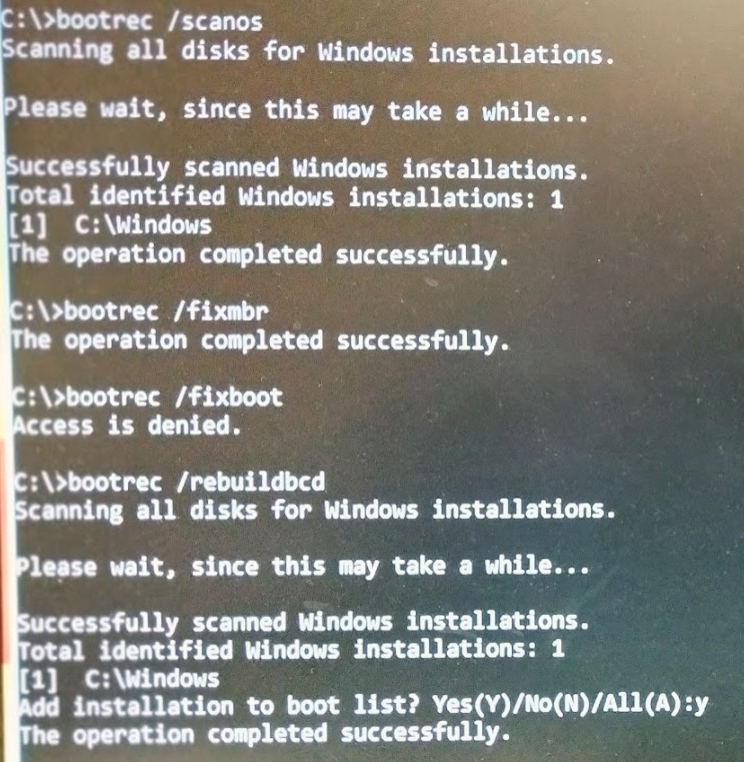
I used diskpart to REMOVE the letter C from the wrong volume and to ASSIGN C to the Windows volume. After that, bootrec /ScanOs did find a Windows installation on C, and bootrec /RebuildBcd allowed me to add C:\Windows to the boot list. Once I did that and rebooted, Windows came up fine.
TL;DR
If you get into trouble with Windows Recovery, make sure that the Windows partition is assigned a drive letter! Usually that will be drive C. Then bootrec /rebuildbcd should be able to find the Windows installation:
Update June 2, 2026
This post helped me today:
https://www.niallbrady.com/2021/09/26/fixing-total-identified-windows-installations-0/
Even with a drive letter on C:, bootrec /scanos was unable to find a Windows installation.
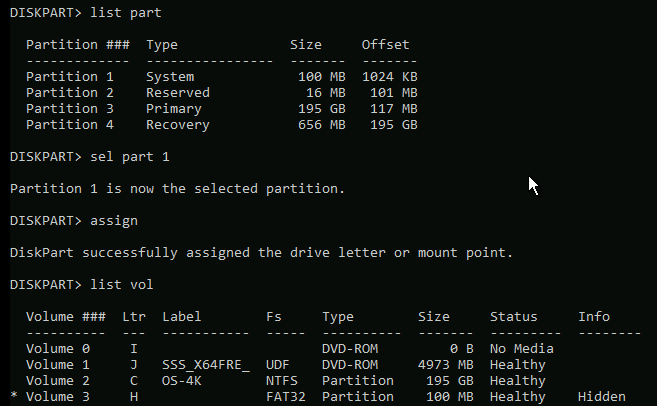
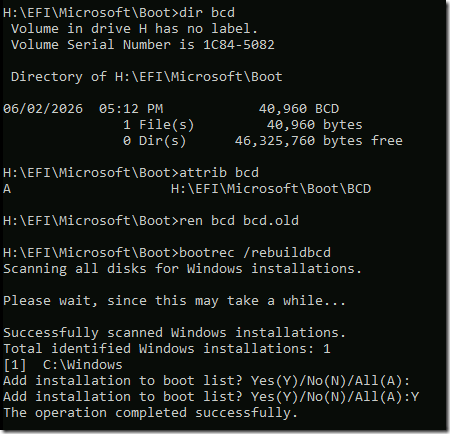
Following Niall’s advice, I assigned a letter (H:) to the EFI partition, renamed H:\EFI\Microsoft\Boot\BCD to bcd.old (it was already unhidden and not a system file), and then bootrec /rebuildbcd worked. The reboot again wanted to do a startup repair, but this time the repair succeeded and the OS (Server 2022) started.