
A couple years ago, Microsoft started pushing Security Defaults as the best baseline configuration for Microsoft 365 / Entra users when the customer is not paying for Entra P1 or P2 licenses (in which case Conditional Access is preferred).
I’ve learned recently that Security Defaults does not always require MFA when you think it will.
From Microsoft’s Security defaults in Microsoft Entra ID article, this important sentence (emphasis mine):
After users complete registration, they’ll be prompted for another authentication whenever necessary. Microsoft decides when a user is prompted for multifactor authentication, based on factors such as location, device, role, and task.
Two days ago, Huntress wrote about an password-spraying campaign that sometimes bypassed MFA if Conditional Access was not configured to cover Azure CLI logins. While this particular campaign has ended because the ISP has blocked the hacker’s account, I wondered if Entra tenants using only Security Defaults were vulnerable.
CoPilot provided the PowerShell code that I used check for ROPC access to the Azure CLI:
$TenantId = "yourtenant.onmicrosoft.com"
$Username = "[email protected]"
$Password = "PasswordHere"

$Body = @{
client_id = "04b07795-8ddb-461a-bbee-02f9e1bf7b46"
grant_type = "password"
scope = "https://graph.microsoft.com/.default"
username = $Username
password = $Password
}

Invoke-RestMethod `
-Method Post `
-Uri "https://login.microsoftonline.com/$TenantId/oauth2/v2.0/token" `
-ContentType "application/x-www-form-urlencoded" `
-Body $Body
Environment: Entra P2 licensed but no Conditional Access Policies configured. Authentication Migration status = In progress. Hybrid AD joined. Tested two non-admin users, one AD joined and one cloud-only, each one configured with MS Authenticator for 2FA. The results were identical:
- Security Defaults off, Per-User MFA Disabled: ROPC token issued
- Security Defaults off, Per-User MFA Enforced: ROPC token blocked (invalid_grant)
- Security Defaults On, Per-User MFA Disabled: ROPC token issued
- Security Defaults On, Per-User MFA Enforced: ROPC token blocked (invalid_grant)
#1 and #3 looked like this:
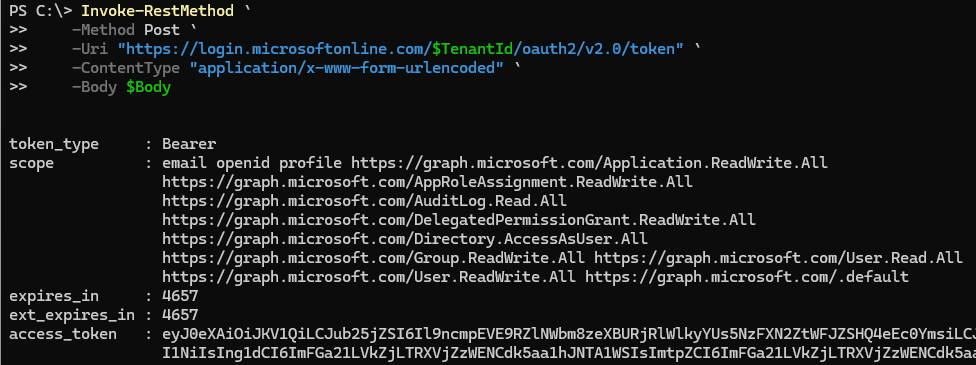
#2 and #4 looked like this:

It’s #3 that concerns me. Security Defaults by itself does allow Azure CLI access and does not require MFA. I thought enabling Security Defaults would in itself enforce MFA, but apparently not always.
Conclusions
1. Passwords still matter. If a hacker figures out a way to bypass MFA, they’ll only get in if they have the correct password.
2. Per-User MFA may be more reliable than Security Defaults. At least it would block Azure CLI logins if Enforced. Does it push more MFA prompts on a day-to-day basis? Maybe a few, but browser and app logins (e.g. from Outlook) are still cached, so if users are on the same computer and browser, or the same phone, they won’t be prompted often.
Unfortunately, Per-User MFA is clunkier to set up properly. With Security Defaults disabled, admins must set each user to Enforced in the Entra Per-user multifactor authentication tab.
Caution: if you’ve been using Security Defaults and go back to Per-User MFA, you may find that users who set up MFA on a phone two years ago have never been prompted since, so they suddenly need to set up MFA on their new phone. Be prepared for calls for help.
I look forward to the day when we can enable Security Defaults and know that every new login will require MFA. For now, it looks like Per-User MFA, when it is set to Enforced, will more consistently require MFA than Security Defaults.