
I recently installed a Dell PowerConnect 2824 switch, my first foray into managed switches and gigabit networking. I blogged earlier about how to set it up and how to use it for bandwidth monitoring.
The client where I installed the switch reported that an XP workstation (a Dell OptiPlex 755 with a gigabit NIC) was extremely slow to log on immediately after a reboot. Like five minutes or more slow. Once the logon did finally complete, I saw that a logon script had failed to map network drives, although I could map them manually. The issue did not seem to happen on older workstations with 10/100 NICs.
I spent some time chasing event log messages (like Userenv event 1053, “the RPC server is unavailable”) to no avail. To make a long story short, the solution is to enable Fast Link mode on the PowerConnect switch for all ports except those connected to routers, switches, and hubs. Once enabled for this device, I could complete a logon within a few seconds, even right after a reboot.
In PowerConnect 2824 web interface, go to the Switch > Spanning Tree > Port Settings page, and click Show All in the upper right corner. That opens a new page with all ports and settings. Enable Fast Link on the ports connected to endpoints like workstations and IP phones:
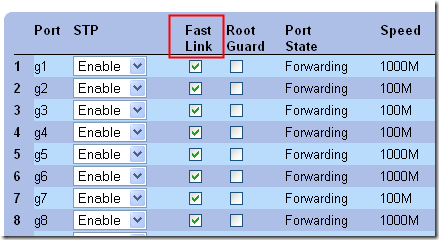
The Dell switch support team came through once again, this time with a helpful explanation of what Fast Link is doing and when to enable it. I later learned that this is not a new problem. Here’s a relevant Cisco article apparently written in 2000:
Using PortFast and Other Commands to Fix Workstation Startup Connectivity Delays
As for why it took 5+ minutes for a logon to complete (when spanning tree negotiation should only take 30-40 seconds with Fast Link disabled), my hunch is that with Fast Link disabled, the workstation has issues even before a user logs on. If the workstation thinks that the network is there and immediately starts attempting to connect to the server (for running computer Group Policy etc.), that connection will fail if the switch port is still checking the spanning tree (listening and learning phases). Once that initial server connection fails, other things will be slow as well (DNS, logon, etc.). Fast Link lets the workstation connect to the server almost immediately, so DNS, time sync, and GPO processing can happen as expected.
In my experience, the problem is probably more related to the Dell switch than STP. I’ve had a lot of problem with these switches over the years. STP in well-engineered switches is rock solid.
It is not limited to Dell; I’ve seen problems with other managed switches in that price segment. it is simply a matter of “you get what you pay for”. If a customer is on a budget, don’t use a managed switch.
As for the logon taking 5 minutes, in my experience that is almost invariably related to DNS issues. Without DNS, Windows falls back to broadcast resolution. The DNS issues could be caused by your loss of network connectivity, or it is also possible that the workstation didn’t even get an IP address via DHCP.
Kevin, this switch has also been very solid in the five years since I wrote this article. Yes, it was probably DNS, which was failing because the switch did not have Fast Link enabled. In other words, I’m not saying the switch implements STP incorrectly; I’m saying with STP, when connecting to a local device, one should enable the Fast Link option (which was not the default). The linked Cisco article also recommends PortFast for its Catalyst 5500; in their test, connectivity delay dropped from 30 seconds to 1 second.
i can’t thank you enough for this…
you saved me from many troubles.
In the begening of the article you mention about : “blogged earlier about how to set it up and how to use it for bandwidth monitoring. ” but the links are not working are leading to 404 error pages.
Is it possible to found them somewhere for further reading?
thank you again.
Hi George – I’ve updated the links.