
I seem to always have to go hunting for the syntax to run DISM /restorehealth, so here are a few quick examples.The basic command for online cleanup:
dism /Online /Cleanup-Image /RestoreHealth
If it complains about not finding sources, you can mount the installation ISO (right click, Mount), then use it as a drive. Let’s assume it’s a .wim file on drive F.
First we need to determine which index of the WIM file contains the OS you are repairing:
dism /Get-WimInfo /WimFile:F:\sources\install.wim
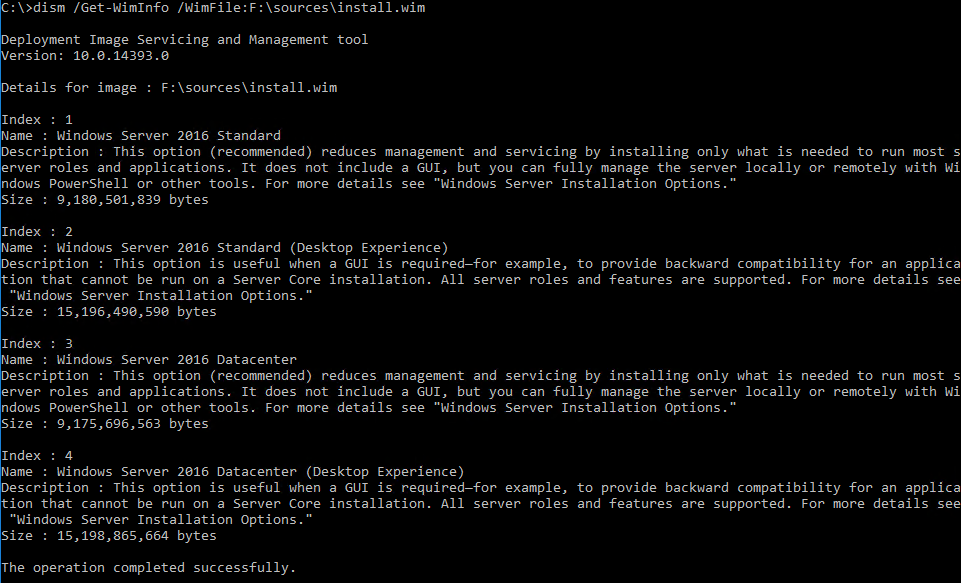
In this case, we want index 2, Server 2016 with a GUI (“Desktop Experience”). Specify that index after the last colon in the /Source parameter:
dism /Online /Cleanup-Image /RestoreHealth /Source:wim:F:\sources\install.wim:2

If using a Windows 10 USB with an ESD file, use this command:
dism /Get-WimInfo /WimFile:F:\x64\sources\install.esd
and then, if the desired version of Windows 10 is at index 6 (notice /Source instead of /WimFile):
dism /Online /Cleanup-Image /RestoreHealth /Source:wim:F:\x64\sources\install.esd:6
Update November 27, 2025
From this thread, helpful instructions on using DISM to install Windows updates:
From the Microsoft Update Catalog, download the packages that the support article lists and place them together in C:\WU. There may be more than one package (as there is this month for KB5068861) and they may need to be installed in a specific order. If you want DISM to handle the order automatically, run:
DISM /Online /Add-Package /PackagePath:C:\WU
That won’t necessarily make the package(s) install correctly, but you’ll have more information about what works and what fails.
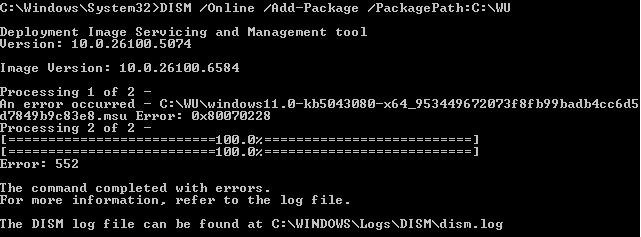
If you need to install individual MSUs, DISM can do that too:
DISM /Online /Add-Package /PackagePath:C:\Packages\windows11.0-kb5043080-x64....msu

DISM /Online /Add-Package /PackagePath:C:\Packages\windows11.0-kb5068861-x64....msu
If KB5043080 is a prerequisite and it’s failing, that could explain why KB5068861 keeps try to reinstall…