
In a small Windows 2003 R2 domain environment, I had the following error in the System event log on a Windows XP Pro client: W32Time, Warning, Event ID 36: The time service has not been able to synchronize the system time for 49152 seconds because none of the time providers has been able to provide a usable time stamp. The system clock is unsynchronized.
So how do I check where W32Time is looking for its time providers?
The Windows Time Service now uses the w32tm command-line utility to configure the service. Unfortunately, running w32tm /config does not display the current configuration. Instead it simply tells you, “No configuration change specified!”
Well, configuration changes are no doubt stored in the registry, but where? w32tm does provide a registry dumper. By default, w32tm /dumpreg shows you the contents of
HKLM\System\CurrentControlSet\Services\W32Time
If you want to see settings in subkeys to that key, you must use the /subkey parameter. For example, w32tm /dumpreg /subkey:Parameters will list values from this key:
HKLM\System\CurrentControlSet\Services\W32Time\Parameters
/syncfromflags
In my case, I want to confirm that the client is configured to receive its time from the domain controller. It’s clear from the w32tm command descriptions (w32tm /?) that I can configure the domain source by typing w32tm /config /syncfromflags:DOMHIER. But how do I check the value without changing it?
Through trial and error on another computer, I was able to confirm that the /syncfromflags parameter is controlling this registry value
HKLM\System\CurrentControlSet\Services\W32Time\Parameters\Type
In particular:
/syncfromflags:DOMHIER sets Type to NT5DS (sync with domain controller)
/syncfromflags:MANUAL sets Type to NTP (sync directly with NTP server)
/syncfromflags:MANUAL,DOMHIER sets Type to AllSync
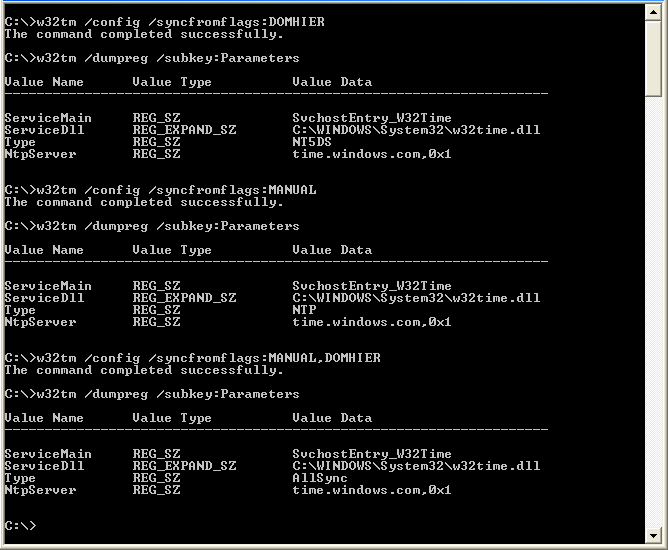
So now, finally, I can run w32tm /dumpreg /subkey:Parameters, check value of Type, and know whether Windows Time is looking to the domain controller, the manually-configured peer list, or both as its time provider.\
Update February 11, 2013
More Interesting Subkeys
Note that w32tm does not provide configuration options to change these values—you’ll have to use regedit or group policy. Full details in this TechNet article.
w32tm /dumpreg /subkey:Config
HKLM\System\CurrentControlSet\Services\W32Time\Parameters
Includes values MinPollInterval and MaxPollInterval. Used when system determines polling interval (domain client, or NTP client with 0x8 suffix). Expressed in Log(2) seconds—see this post. Default range of 10–15 is 17–546 minutes.
w32tm /dumpreg /subkey:TimeProviders\NtpClient
HKLM\System\CurrentControlSet\Services\W32Time\TimeProviders\NtpClient
Includes value SpecialPollInterval. Used when NTP client specifies 0x1 suffix. Expressed in seconds. Default of 604800 is 7 days.
Update August 21, 2018
Thanks to this post for some additional commands:
w32tm /query /configuration – probably the preferred way to get some of the info I was getting from /dumpreg
w32tm /query /source – This should not show “Local CMOS Clock”. If it does, there’s a “Contingency” section at the bottom of that post that explains how to re-register the time service (basically wipe it out and re-configure it from scratch).
The same author has an even more extensive post here, which includes a link to a Microsoft Easy fix for configuring servers time here.